
How Can We Help?
-
BWT Precision AutoTrader
-
Tech Talks
-
ChartCast
< All Topics
Print
001 – Setup
PostedNovember 11, 2025
UpdatedNovember 11, 2025
ByBWT Bob - The TickProphet
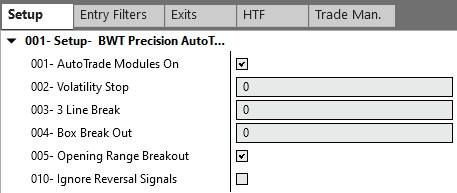
Section 001 of this tab is used to turn on the different trading modules. A trading module is logic that tell the AutoTrader when to take a trade.
- 001 – AutoTrade Modules On
- If this box is checked, the AutoTrader is armed to take trades
- 002 – Volatility Stop
- 0 = off
- 1 = Trade signals will be fired when the bar color changes using the Precision Trend Indicator
- 003 – 3 Line Break
- 0 = off
- 1 = Trade signals will be fired when the 3 line break logic triggers a trade
- 004 – Box Break Out
- 0 = off
- 1 = A trade will be fired when the price of a bar closes out side the breakout box points
- 005 – Opening Range Breakout (Premium Module)
- If you do not see this option, you are not subscribed to the ORB Premium Module or an Elite Member
- Unchecked = off
- Check = Trade signals will be fired based on the Opening Range Breakout indicator settings.
- 010 – Ignore Reversal Signals
- If this box is check, if you are in a long trade and a short signal is generated, the AutoTrader will leave you in the long position and ignore the short.
- If this box is unchecked, if you are in a long trade and a short signal is generated, the AutoTrader will close the long position and initiate a short trade.
Table of Contents